Matthieu BAILLY
Game Designer

Essay
(French)
Resume
(French)
Resume (English)


Synos

A 3D roguelite game in TPS view, where the goal is to build a hamlet of tranquility in a solarpunk universe set in the main character's mind.
The latter actually has a harsh life, which he softens through the creation of a model of his ideal world: Synos. The player therefore control the character's imaginary avatar, immersed in this model which he builds little by little.
Genre
Action / Roguelite
Support
PC / Unreal Engine 4
Date
January 2022 - June 2022
6 months
Roles
Game Designer,
Level Designer,
Script Blueprint,
Integration,
Modeling,
Game Tester
Context
Synos is my 4th year project, with free subject. Since we knew each other's strengths and weaknesses but also complemented each other well, my group and I decided to work together again this year. This project was supposed to last 2 years, thus we took extra time for pre-production to get everything ready. However, during production, it was decided that we would complete production at the end of the year, to be able to carry out a new project from the start in better conditions the following year. That said, we wanted Synos to be much more professional than its predecessor. The final product is therefore a demonstration of the main mechanics that we wanted to implement. On this project, I was responsible for the Game Design, all of the game scripting, most of the asset integration and some modeling.
Download
Here is a download link to play the game!

Synos Demo Build
(.zip Archive)
Walkthrough
Here is a video walkthrough of the demo.
Tutorial
Our demo represents the entire tutorial initially planned for Synos. Here is a section dedicated to it.
A good tutorial should show the player all the options they have to interact with the game. So we decided to apply this, step by step, to ensure that the player has practiced everything he needs to know in order to be able to play comfortably afterwards.

Complete hub plan (Mindscape), Concept Art by Loeiz Legrand
Captions :
Start : The player starts in the camp, which is a confined place where he learns the basics of movement.
1 : To escape the camp, the player must jump over a lowered barrier. The corresponding button is indicated. This way, we ensure that the player knows how to move properly.
2 : Finally free to explore, the player will learn to interact with the world. He must now experience the main gameplay, which consists of collecting materials from harvest points (green dots) and defeating monsters (purple dots). Then, he must recover every material he can. These objectives are displayed via an objective indicator at the top right of the screen, and by arrows directly moving above the objectives.
Number 2 represents an obstacle that tests the player's movement skill, which would subsequently be put to the test regularly in procedurally generated levels.
3 : The player must now learn how to rebuild a building, and the materials from the previous step will be put to this use. By interacting with the construction panel, the player will have their first encounter with the construction interface and will be able to rebuild the workshop.
4 : Once the workshop is rebuilt, we'll show the player that he can also interact with elements of the world, such as a generator. By activating it, the central freight elevator will restart, which will allow the player to start game runs.
5 : We've yet to ensure that the player knows that he can use an aiming mode to reach distant enemies more easily with his ranged attacks. This is why, to finish activating the freight elevator, he will have to use this mode to shoot once in the freight elevator's engine and unblock it.
6 : Finally, all the player has to do now is to use the freight elevator to start his first game in a procedurally generated environment.
Game Concept
In this section you will find a very abbreviated but more comprehensible version of the game design planned for the Synos game, to give an idea of the game initially wanted. You can find the game concept document in detail in the "Extras" section at the bottom of the page.
As explained earlier, we had prepared for 2 years of development, which finally stopped after just one. This led to a huge drop in final content, but some game design did take place to prepare such content.
You will find it out further down in this section!
Game World & Environment
The dystopian reality / utopian imagination duality played an important role in the game.
Our game had more levels planned: to express this duality, we had prepared a level in the reality realm, while the hub, as well as the 3 biomes to explore, were set in the mindscape of the character, inspired by the model they are building.
Most of the game time would have taken place in these 3 biomes: the Plains, the Desert and the Swamp, which would have been unlocked as the construction of the hub progressed, and which would have become more difficult. The apartment was designed to be a narrative interlude at each stage of the game's progress.
The ultimate goal of the game is to help the main character reconcile with reality, through the construction of his ideal hamlet.

Apartment (Reality), Concept Art by Yaël Préjeant

Complete hub plan (Mindscape), Concept Art by Loeiz Legrand

Plains biome concept (Mindscape), Concept Art by Loeiz Legrand
Gameplay & Mechanics
The idea was to encourage exploration in our procedurally generated biomes to collect materials and rebuild the hub with them. The desired mechanics are those shown in the demo, allowing harvest of materials and emphasizing it, consequently leading to the reconstruction of the hub.
We planned roguelite elements such as equipment (weapons and armor) granting stat bonuses and special abilities, in order to spice up the game runs.
Our biomes would have been divided into several "rooms" placed end to end procedurally, and the player would have had to clear these rooms of their monsters to access the next one. At the end of the 4th room is a boss that must be defeated to exit the biome with all the materials collected. However, before doing so, the player can choose to restart a series of 4 rooms to collect more materials, before being faced with this choice again. He can make this choice up to 4 times, before being forced to confront the boss, who will have strengthened depending on the number of times the player has restarted this loop.
The goal of this game mechanic was to get the player to challenge their skills by increasing the risk and the rewards.
Finally, if the player were to die, it was planned to “boost” a room in the fatal biome by making it more difficult but also more rewarding during their next visit. The idea behind this mechanic was that the character nourished his own model with the gift of his body, although imaginary, and made death more interesting.
Scripting
Here are some examples of scripts created for Synos. With my gathered experience, I had already planned my code to be flexible, commented and optimized. The aim was to be able to add new functions quickly, later in development. Of course, this project being larger than the previous one, I was once again able to gain experience in scripting throughout the year thanks to the new needs of this project.

I started from a third-person game character template to create our entire character. I added an interaction system for the environment, a dash system taking the terrain into account, an attack mode that can execute 4 different attacks, as well as an aiming mode for the ranged attacks. Attack mode automatically deactivates upon interaction or if the player stops attacking for a while. This is also where the pause menu is managed.
Otherwise, this script also manages the passive reactions of the character, such as feedback from taking damage, death, speed boost from monster elimination combos, or automatic material attraction.

The enemies in the tutorial are controlled by an AI system I did, thus I was able to discover this part of the script process and learn how to use it. This AI is set to chase the player if they pass into the monster's field of vision, otherwise it wanders in a small area around its starting point. The enemy accelerates when pursuing the player.
Since it is early game, these enemies can only attack the player if the latter is in contact with them, but the player will suffer knockback from the hit. They remain easy to defeat, especially at a distance.
They also react to hits from the player with animation and sound feedback, and the same goes for attacks inflicted on the player.

One of our main mechanics is to rebuild ruined buildings, using materials collected from harvest points or monsters. These materials are added to the character's inventory, to be used later in the Building construction script.
This script checks that the player has enough materials in order to rebuild the building. When construction is confirmed, the required materials are removed from the player's inventory and the construction begins.
All of this info is shown in-game via the construction interface that this script displays when interacting with it, so that the player can know the exact quantities of materials required.

Here is one of the tools I designed for level building. This is a random object generator along a curve, or spline, in order to facilitate the placement of assets and to increase realism of objects chains like the paths above. I added an option to activate or deactivate the collision of objects, another to make their rotation random, and finally another to offset the objects from the spline, in order to make the chains more sparse. These last two options can have their intensity configured.

This script is another level building tool, with a name close to the old one but different in its operation. It uses splinemeshs, in other words stretchable objects, which will adapt to the spline. Thus, we can obtain chains of coherent objects with a single object deformed in multiple ways, like the pipe shown above.

This is another type of script that manages the animations of a model's skeleton to make them fluid and consistent in-game. In the case shown above, I use state variables for my character to change animation when he jumps, for example. But this script can also be used to blend animations. This is especially useful when you want the character to use an arm animation and keep their legs moving, such as during attacks or walking or running interactions.
So, I created a separation in the middle of the character's body in order to be able to properly blend his one-off animations with his more constant movement animations.
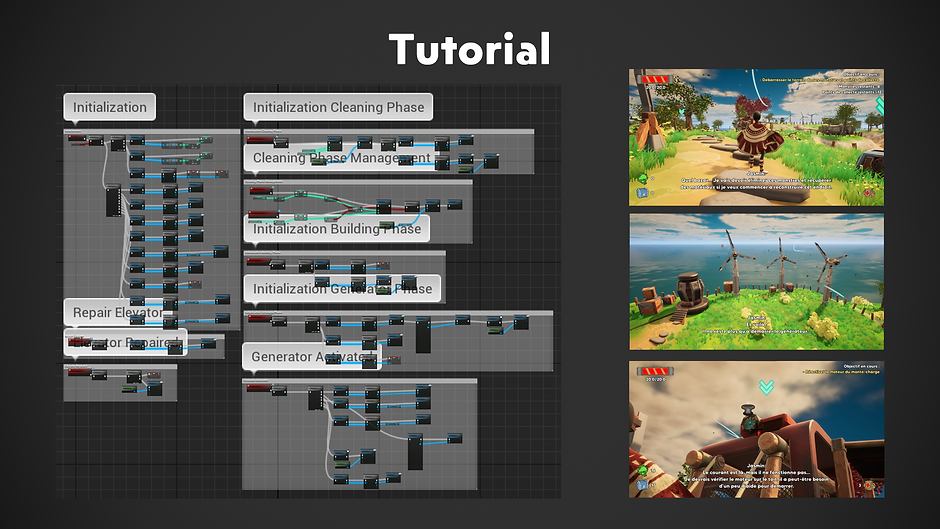
This script exists as a manager for tutorial events, in this case the appearance of indication arrows and objective messages at the top right of the screen, in order to guide the player in his first moments on the game. Each main mechanic is presented to ensure that the player is prepared to face a hostile environment.
Obviously, we didn't want this to remain once the tutorial is finished, which is why it is only put in the level where we want to play the tutorial and only activates once. I also made it possible to skip this tutorial in the editor to save time on tests.

The UI play a crucial role in our game, because they constantly display essential information for the smooth running of the game. These must always reflect the most recent information, such as the acquisition of materials, drops in HP, etc.
It was necessary to create several of them for multiple situations, which is why there is an exploration interface and a construction interface, among others. Each of them is dynamic and allows level designers to change values, such as maximum life or required materials, without having to temper the interface themselves.

Here is one of the materials made for our game: grass. This material causes the grass to be randomly colored in a given color scale, in order to give color variation to the ground and have a more nuanced result. For this I used a basic gradient applying to each blade of grass, combined with a color variation in world position which is blended to the existing gradients depending on a normal map. This way, throughout the surface that the grass occupies, certain places will be more affected by the color variation, giving them consistency. In addition, I added a wind effect in World Position Offset to make the grass more lively.
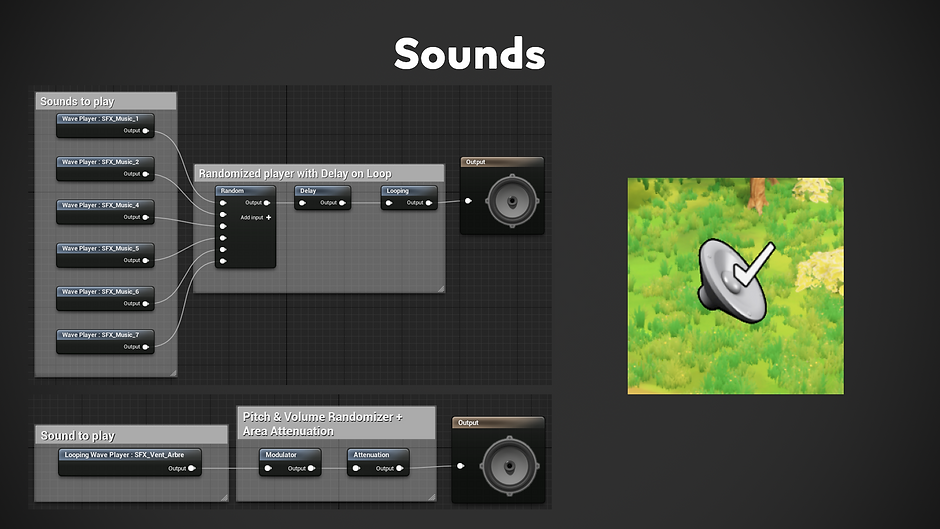
Finally, here are some examples of scripts used for the game's sound part.
For music, it's a Sound Cue using several small pieces of music chosen at random, and which repeats after a while. This gives us a light musical ambiance while the player travels through the game hub, where we wanted to convey a peaceful ambiance.
For spatialized sounds like the wind in the leaves of a tree, I opted for a sound whose pitch is slightly random, in order to once again give variety to the sounds. These sounds are then attenuated depending on the distance between the character and them, so that they are heard louder or quieter depending on the distance. This process was used for all sounds coming from in-game objects, such as enemies, gunshot impacts, sea, etc.
Extras
Here you'll find documents and links related to this project, for more details.
Game Concept Document

Rendering
Modeling