Matthieu BAILLY
Game Designer

Essay
(French)
Resume
(French)
Resume (English)


BioBar

A 3D escape room game in FPS view, inspired by the Artistic Direction of Bioshock.
The player plays as a young woman trapped in an underwater garden, from where she will try to escape. But she is not alone...
3rd year student project, carried out with Loeiz Legrand, Carla Herry, and Marie Duarte.
Genre
Escape Room
Support
PC / Unreal Engine 4
Date
March 2021 - June 2021
4 months
Roles
Game Designer,
Level Designer,
Script Blueprint,
Modeling,
Game Tester
Context
BioBar is my first notable video game project carried out as part of my 3rd year of studies.
With a team of 4 people, we had to provide an escape room video game made with Unreal Engine 4 in 3 months, and its Artistic Direction was to be inspired by that of Bioshock, hence its "Art Deco" aspect.
I participated to the Game Design of the game, modeled the building, and created all scripts of the game.
Walkthrough
Here is a video walkthrough of the full game below.
Level Design
The escape room takes place in a huge underwater garden, with a bar area near the entrance, as well as a upper floor and two platforms which overlook the garden.
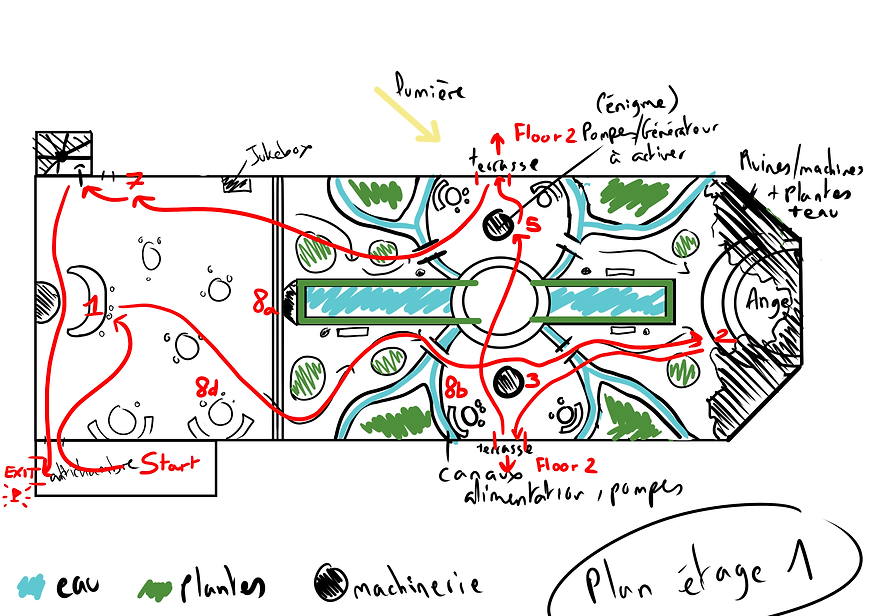
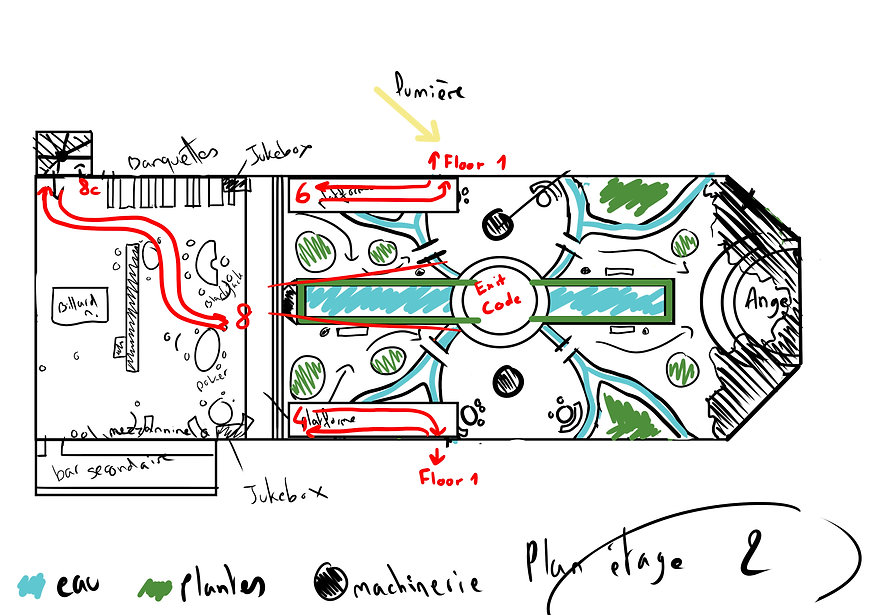
Captions:
Start: The player starts in the anteroom of the bar, where the exit door is also located.
1: Counter. The player must grab the different cocktail glass to open access to the gardens.
2: Copper coil. When the player picks it up, the monster makes a noise and its helmet emits light.
3: South generator. The player must place the coil there to reactivate it and restart the south elevator.
4: Note from the maintenance agent. The player will find the code there to activate the north generator.
5: North generator. Once the code is entered correctly, it will activate the north elevator.
6: Murder weapon. Narrative element which will allow access to the bar's upper floor.
7: Door to upper floor. Has a lock where the murder weapon can be inserted, which will unlock it.
8x: Final puzzle. Point of view from which we can observe the final code inside the globe, in the form of symbols. The key to this puzzle lies in the memos scattered around the game area, giving the player the numbers making up the final code.
Exit: Exit door, requiring a 4-digit code to open and win the game.
Plans by Marie Duarte
Scripting
This section is dedicated to presenting examples of scripts used in the game. At the time, I had just started visual scripting on Unreal Engine, therefore, these scripts are not as optimized as the ones I do today, but these are my early attempts!

Gameplay: Door
The doors in our game are simple: when the player interact with them, depending on their position, they open or close. However, I went a bit further by allowing the player to interact again with the door before it has finished its animation. So, via a timeline, I was able to ensure that the animation was reversed as many times as necessary so that it would seem fluid and logical for the player.

Gameplay: Coil
The coil is a simple interaction element with the player. When the player picks it up, it produces a sound then disappears, having entered the character's "inventory". A message on the interface also indicates that the interaction was successful.
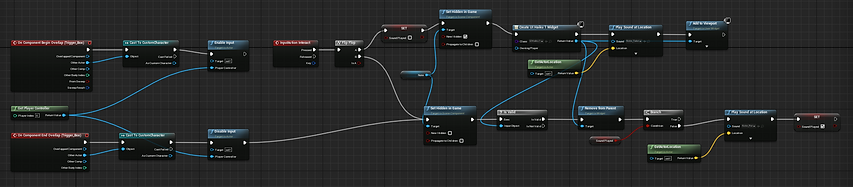
Gameplay: Memos
The memos, to seem logical, had to disappear from their location to be brought into view by the player, then return to their base location once the player had finished reading them. For this, I used a widget which displayed the memo in large size on the player's screen, while the object disappeared, and vice versa, giving the illusion that the memo was taken by the character to read it.
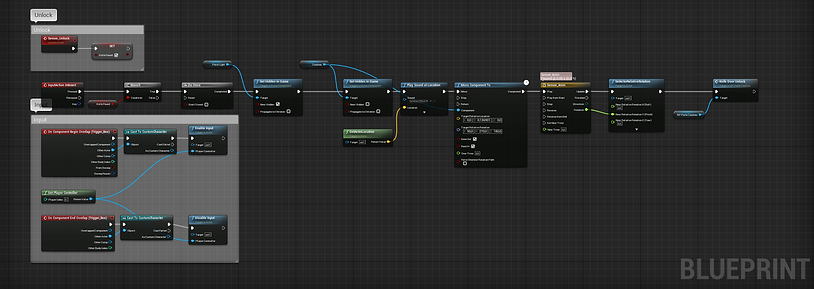

Gameplay: Elevator
The elevators in the game had two fixed positions: their base position at the bottom and a position at the top, which was simple enough. I also anticipated that the player could go down by another means than the elevators and also created a terminal capable of calling them from below.

Gameplay: Digicode
This is by far the most complicated script I've done at the time, since it involves using a widget placed directly in the game area. Nevertheless, I managed to obtain a functional result and I was able to learn from it. Each digicode has a correct number series that is editable in the editor, and resets if there is an error, followed by a feedback sound for the player.

Material: Duct water
The water material of the ducts takes several parameters into account in order to appear more realistic. This includes the depth of the water and the camera angle. The ripples are produced with 3 normals in constant movement.

Material: Water caustics
This material was created to imitate light reflections in pools of water, and make our underwater environment more believable. As this is a Decal that is applied everywhere, it was necessary to make it work in World Position, so that it does not distort oddly in one axis.

Sound: Music
The music used in our game cuts off if the player moves too far away and resumes where it left off if the player is close enough again. By using a timeline, it is possible to record when the music has stopped and start it again from the same moment.

Sound: Glass impact sounds
This is an example of sounds made random during an impact of glass with another object. The script randomly chooses one of the 4 sounds provided for this purpose and applies a pitch multiplier that is also random, thus producing a different and more realistic sound with each impact.
Extras
Here you'll find documents and links related to this project, for more details.

Rendering
Modeling