Matthieu BAILLY
Game Designer

Essay
(French)
Resume
(French)
Resume (English)


Speed Deeps (WIP)
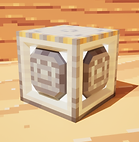
A first-person, 3D platformer focused on speed and momentum, inspired by parkour in Minecraft. The goal is to traverse underground levels as quickly as possible, avoiding obstacles using various blocks with special properties, which are placed by the player while in air. This mechanic is complemented by a streak mechanic that increases speed and encourages the player to chain jumps.
Personal project in progress.
Genre
Fast Platformer 3D
Support
PC / Unreal Engine 5
Date
September 2023 - Today
Still working on it !
Roles
All by myself
No AI used
Context
For this project, I sought to modify and adapt a satisfying personal experience: parkour in Minecraft. Realizing that what I enjoyed was the fluidity of the jumps and the momentum generated, I decided to experiment with this feeling and create a small platformer prototype.
I quickly realized that while parkour is satisfying, players simply follow a set path predetermined by the designer. This led me to the idea of implementing a mechanic of my own that allows players to place blocks to jump onto while already in the air, similar to a double jump, but leaving a trace of their passage.
This page will document the version history of this project, along with my reflections.
Sections:
Prototype #1
Click here to access the section
Prototype #2
Click here to access the section
Prototype #1
Here is a download link to play the first prototype, as well as a link to a survey for testers!
_svg.png)
Speed_Deeps_Proto_v0.1
_svg.png)
Survey
Download
Even though my test sample is very small because I did not judge this prototype suitable to be released to the general public, I still wanted to have it tested by people who also work in video games.
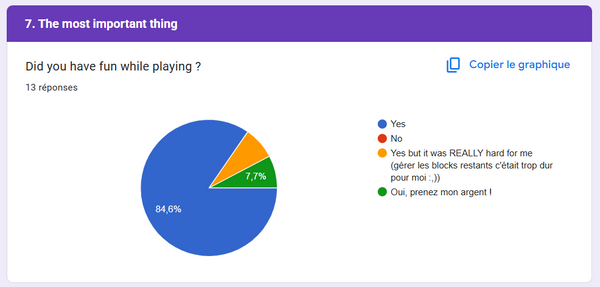
I created a survey covering all the game mechanics of this first prototype, which allowed me to gather valuable feedback on each one. This feedback led to several decisions for the next version of the prototype, which you'll find highlighted in orange in the Features section. Below is the graph of responses to the question "Did you have fun playing?" which encouraged me to continue development. A huge thank you to my testers!
Features
At this stage of development, I wasn't yet sure of the direction I wanted to take with my game. I developed game mechanics for all types of target audiences, and planned to adjust them based on feedback from my testers.
-
Running
Directly inspired by Minecraft and a classic of the platformer genre, this mechanic that increases movement speed aims to save precious time on large surfaces and to build momentum before a jump, thus lengthening its reach. Once airborne, it also affects aerial movement speed, providing greater control for accurately aiming at a landing platform, for example.
-
Crouching
Directly inspired by Minecraft as well, this mechanic drastically reduces movement speed while on ground, preventing falls when moving along the edge of a platform. This feature aims to give beginners enough margin to familiarize themselves with the environment and progress at their own pace.
After the decision was made that the game would be a fast platformer, this feature was removed to encourage players to use their momentum.
-
Block placement
Block placement is the game's core mechanic. It occurs when the player presses the jump button while airborne, and the volume of a block below or in front of them is empty. This mechanic gives the impression of a double jump, except that it leaves a trail behind the player with the remaining floating blocks.
The plan is to exploit this trail by having the player complete all levels in reverse once they reach the end, transforming the blocks into obstacles that the player has placed themselves. Experienced players will therefore need to plan their return route during their first run to optimize their time.
-
Block types
After testing my prototype with block placement, I had the idea to create different types of blocks with various properties in order to create synergies between them, and to further explore the best way to complete a level using these synergies. I limited myself to 6 blocks to avoid overloading the gameplay.
-
Normal Block
The Normal Block is designed to be the block that provides the closest experience to Minecraft parkour: it has no properties and simply allows the player to jump again while into the air from it. In case of excessive vertical speed, this block also allows the player to recover easily while maintaining momentum.


-
Bounce Block
The Bounce Block is inspired by the slime block in Minecraft and allows the player to bounce based on their speed when jumping on it. It synergizes easily with most other block types and allows to go further than a Normal Block when used alone with a different timing.
-
Spring Block
The Spring Block was created to address the need for a quick way to gain height without having to use multiple Normal Blocks. It propels the player vertically, regardless of their speed. This effect synergizes well with the Bounce Block and Launcher Block to enable long-distance jumps.


-
Launcher Block
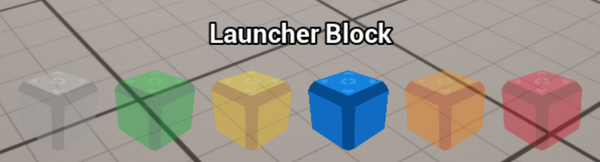
The Launcher Block is the horizontal counterpart to the Spring Block and allows the player to propel themselves in the direction they are looking. It addresses the need for increased speed without having to accumulate Streak, and synergizes with the Bounce Block and Spring Block to jump over long distances.
-
Repulse Block
The Repulse Block is a unique block based on wall jumping, an ability that allows the player to jump off a wall to regain height. It appears in the player's direction of movement and is used repeatedly to reach high places or to perform quick U-turns without losing momentum.
Feedback indicated that this block was neither simple enough to use nor well-suited to the fast-paced gameplay chosen for the next version of the game, so it will be removed from the next version.


-
Stop Block
The Stop Block was designed to bring the player to an abrupt stop in the event of a fatal obstacle if their speed is too great to be halted by aerial movement alone. Like the Repulse Block, it is positioned in the direction of the player's movement to ensure a complete stop to their horizontal speed.
-
Block hotbar
I needed a way to change the type of block used once they were implemented. I decided to integrate this system with a hotbar at the bottom of the screen where each block is represented and selectable by scrolling with the mouse. In anticipation of future development, I also made this hotbar dynamic, changing based on the blocks available for each level. The goal is to avoid giving away all the blocks every time and to challenge the player by changing their gameplay tools.
One tester didn't find this hotbar user-friendly, and I understood their point of view. I'm considering a new way to change block types more efficiently, as scrolling in a hotbar that can change from one level to another can be disorienting. I think assigning a button to each block type could be a good idea.
-
Crosshair
Crosshair is a small accessibility feature that I've gotten into the habit of integrating for first-person games to limit motion sickness, especially for a fast-moving game.

-
Slow Motion
For accessibility reasons, I decided to integrate a slow-motion mechanic to help beginner players move smoothly at high speeds. This mechanic is limited by a gauge that fills with each jump and empties when slow motion is used.
Despite positive feedback from testers who used it, I believe this mechanic is ultimately unsuitable for a fast-paced platformer. It will be removed in the next prototype.

-
Speedmeter
With the intention of rewarding the player for the maximum speed achieved during a level, I thought it would be relevant to continuously display their movement speed on the game interface.
I plan to adapt the indicator's unit to miles per hour for the game's localization for players using that metric system.

-
Streak mechanic
I wanted to make my game unique by giving it a special mechanic rarely seen in the platformer genre. Thinking back to my gaming experiences at the time, I remembered the streak mechanic from the Devil May Cry series, wanted to adapt it for my platformer and linked it to movement momentum. Thus I created a streak mechanic that increases each time the player touches a new platform, ensuring they are always moving. To add more depth, I also decided it would increase the character's speed, allowing experienced players to plan their routes more carefully to achieve the best times. The streak is reset if the player touches the same platform twice, remains on the same platform for a set amount of time, or stops moving.

-
Lobby
With the game mechanics in place, I decided to create a game environment tailored to them, allowing testers to better visualize my vision for the game. I therefore built a lobby where players spawn and find explanatory text about the main mechanics. They have access to all types of blocks and can use them indefinitely within the lobby. To this end, I built a playground with varying terrain and challenges. It also features six doors leading to levels that highlight the usefulness of each type of block.

-
Level prototypes
I created 6 levels, one for each type of block, to isolate each one in situations that highlight its strengths. Each of these levels is a course to be completed as quickly as possible with a limited number of blocks.
-
Normal Block
The Normal Block level is designed to be the first test level the player will try. It therefore includes a short introductory section on basic movement before requiring the use of the block-placing mechanic. The Normal Block will then be used to escape falls onto deadly spikes and traverse corridors without platforms.

-
Bounce Block

The Bounce Block level takes advantage of its properties by giving the player speed before using it. It alternates between sections of very vertical drops and sections where the player have to use bounces to cover horizontal distance.
-
Spring Block
The Spring Block level once again alternates between vertical and horizontal elements. It begins with a stair-like corridor for its most basic use, then is used to traverse distances using the player's horizontal speed, and ends with a final ascent around a pillar.

-
Launcher Block

In this very horizontal level, I highlighted the Launcher Block's ability by having the player first make simple long jumps, then jumps into angles without platforms, and finally a long corridor that he must cross using the accumulated speed given by the block.
-
Repulse Block
Since the Repulse Block is a block that allows the player to gain height by going back and forth, I decided to create a level entirely stairs-like, with a first learning part and a second challenge part with spikes.

-
Stop Block

The final test level is the Stop Block, used to stop in front of deadly hazards when the player is propelled at high speed. It uses Launcher Blocks for this purpose. It begins with a vertical section where the player is launched successively against spikes, and ends with long horizontal corridors where the player must stop above gaps to avoid falling into spikes.
-
Stopwatch
A speed game wouldn't be complete without a timer; otherwise, players can't properly assess their performance. This timer is located below the block hotbar and changes from a format of xx.xx seconds to x:xx.xx when reaching a minute for clarity at the start of a level. It only starts when the player begins moving at the beginning of a level, giving them time to explore in Scouting Mode.

-
Ranks
I decided to implement a ranking system for every level to measure player performance and encourage improvement. Once a level is completed, a ranking screen appears as shown below. Ranks are determined by three criteria: the time taken to complete the level, the maximum speed achieved, and the maximum streak achieved. For each level, the objectives for each criterion represent the maximum rank, the S rank. The overall rank for the level is then determined by averaging the ranks for each criterion. The S+ rank is awarded to players who manage to achieve an S rank in all criteria.

-
Scouting Mode
For players wanting to learn the level layouts beforehand, I've added a Scouting Mode mechanic that allows free movement within the levels without being killed by obstacles. It can be activated at any time during the level, as long as the player is stationary and on the ground, but it's most effective at the beginning of the level.

-
Remaining blocks counter
In this prototype, I decided to limit the number of blocks per level, thinking that having an infinite number would lead to performance issues since the blocks remain in place after the player passes through. To give players the freedom to create their own path, this count is global regardless of the type of block used and is large enough that the end of the levels can be reached without necessarily having to optimize the route based on this criterion. On the interface, the number of remaining blocks is displayed in the center of the screen and decreases with a slight animation each time a block is placed to highlight this information for the player.

-
Quick restart
By testing and completing my levels, I realized it would be useful to be able to instantly retry a level at the end to improve one's score. Ultimately, I decided to make this quick restart available at any time within the level, allowing players to restart if they make a mistake. Players who want to practice a particular level can therefore do so as often as they like and improve quickly.
Prototype #2
The second prototype is currently under development !
Features
Based on the feedback gathered on the first prototype, I was able to decide on the direction of my game. It will be a fast-paced, momentum-based platformer, and consequently, some features have been removed, changed, or added to better fit this vision.
-
Better block placement
One issue from the first prototype that stuck with me was a problem with block placement. As I had scripted it, blocks couldn't be placed when the character was against a wall because the block's volume couldn't be accommodated there. So I reduced the minimum required volume so that players could place blocks even against a wall.
-
Coyote Jump
A second relevant piece of feedback was that when a player wanted to jump off the edge of a platform, they sometimes unintentionally used a block because they were already suspended in mid-air. To correct this in future versions of the game, I added a Coyote Jump mechanic that introduces a very short window of time after leaving a platform during which the player can still jump without using a block. This allows players to gain momentum on platforms without the risk of accidentally using a block.